Collaboration & Sharing
T-Sketch is built for real-time collaboration. Multiple people can draw, edit, and brainstorm on the same canvas simultaneously with instant synchronization.
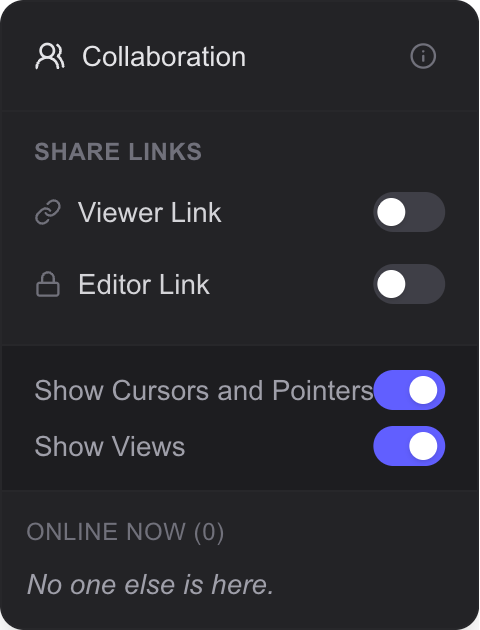
Share links, collaborator list, and visibility toggles
Real-Time Editing
Every change you make is immediately visible to all other collaborators on the same sketch. The system uses optimistic updates — your strokes and edits appear instantly on your screen and are synchronized with the server in the background.
Each user has an independent undo/redo stack (up to 100 actions), so you can undo your own changes without affecting anyone else's work.
Live Cursors
When collaborating, you can see the cursor position of every other participant in real time. Each collaborator is assigned a unique color so you can easily tell who is working where.
You can toggle cursor visibility on or off in the Collaboration panel.
Collaborator Views
View rectangles show you what part of the canvas each collaborator is currently looking at. These appear as semi-transparent colored rectangles matching each user's assigned color. This is especially useful on large canvases where team members may be working in different areas.
Click a collaborator's avatar to instantly jump to their viewport location.
Pointer Trails
In Scene, you can enable Scene Pointer Mode which creates laser pointer-style trails as you move on the canvas. This is ideal for touch devices and presentations where you want to point at something for others to see.
- Trails fade out after 2 seconds and are removed after 3 seconds
- Trail color is selectable
- Visible to all connected collaborators
Sharing Links
You can share your sketch with others using two types of links:
| Link Type | Permissions |
|---|---|
| Viewer Link | Read-only access — can view, navigate, and watch presentations but cannot edit |
| Editor Link | Full editing access — can draw, add objects, and modify the canvas |
Sharing links are managed from the Collaboration panel, accessible via the collaboration widget in the top-right corner.
Viewer Mode
When someone accesses a sketch through a Viewer link, they enter read-only mode. In this mode:
- All editing controls are disabled with a view-only overlay
- Undo/redo, cut, and paste are blocked
- Keyboard shortcuts for editing are disabled
- Navigation, viewing, and watching presentations still work
- Viewer mode is enforced on both the client and server side
Collaboration Panel
The Collaboration panel provides a central place to manage your collaborative session:
- See the list of currently connected collaborators
- Connection status indicator (connected, reconnecting, syncing)
- Toggle visibility of cursors and pointer trails
- Toggle visibility of collaborator view rectangles
- Manage sharing links (viewer and editor)
Graceful Reconnection
If your connection drops temporarily, T-Sketch handles reconnection automatically. The system detects staleness (after a 5-minute threshold) and performs version tracking for incremental sync. If the version gap is too large, a full state refresh happens transparently.
During reconnection, you'll see status indicators like "Reconnecting..." and "Syncing..." in the UI. Your local changes are preserved and merged once the connection is restored.