Text
Add rich text to the canvas with formatting, 45 fonts, and scalable rendering. Press T to switch to Text mode.
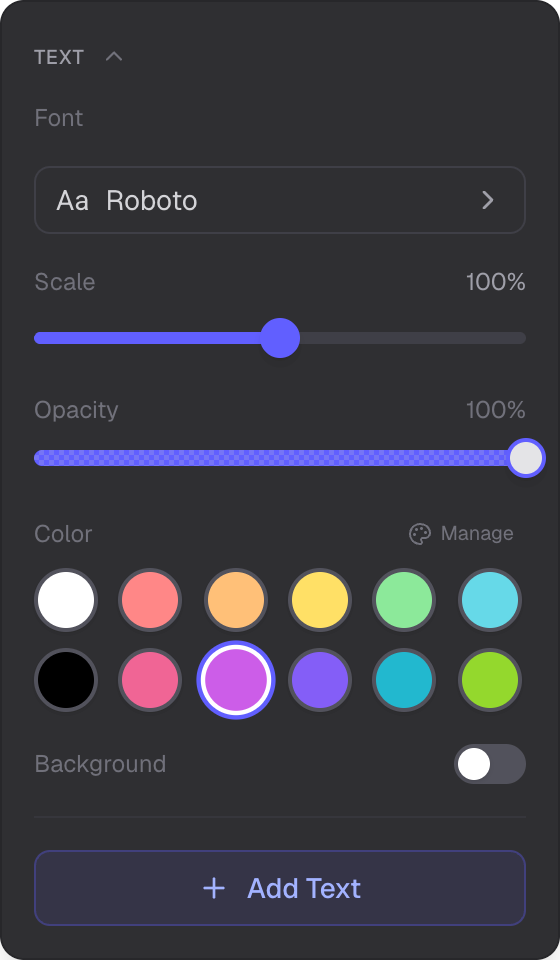
Font selection, scale, opacity, color, and background controls
Creating and Editing
Click Add Text in the panel to create a new text object at the center of your view. Double-click any existing text object on the canvas to edit its content. The rich text editor opens as a dialog with a full formatting toolbar.
Rich Text Formatting
The text editor is powered by TipTap and supports:
- Inline styles — bold, italic, underline, strikethrough, superscript, subscript
- Headings — Heading 1 through 4, plus normal paragraph
- Lists — bullet lists and numbered lists
- Alignment — left, center, right, justify
- Highlight — multi-color text highlighting from your palette
- Links — add and remove hyperlinks
- Block elements — block quotes and code blocks
- Images — upload images inline within the text content
Fonts
45 built-in fonts in 5 categories:
- Sans-serif — DM Sans, Inter, Josefin Sans, Lato, Montserrat, Nunito, Open Sans, Oswald, Poppins, Quicksand, Raleway, Roboto, Rubik, Work Sans
- Serif — Bitter, Crimson Text, EB Garamond, Libre Baskerville, Lora, Merriweather, Playfair Display, PT Serif, Source Serif 4
- Display — Abril Fatface, Alfa Slab One, Bebas Neue, Comic Neue, Fredoka, Lobster, Pacifico, Permanent Marker, Righteous
- Handwriting — Amatic SC, Architects Daughter, Caveat, Dancing Script, Indie Flower, Kalam, Patrick Hand, Shadows Into Light
- Monospace — Courier Prime, Fira Code, JetBrains Mono, Source Code Pro, Space Mono
Panel Controls
- Font — opens a font chooser dialog with all 45 fonts
- Scale — 1% to 1000% with a non-linear slider (100% snapped at center)
- Text opacity — control text transparency
- Color — 12-slot palette sets both text and background color (see Color Management)
- Background — toggle on/off with a fill opacity slider
Rendering
Text objects render as GPU-accelerated textures for correct z-ordering with other canvas objects. The HTML content is converted to a canvas texture at the specified scale.
Related
- Color Management — palettes, Copic colors, and eyedropper
- Selection — select and edit text objects
- Images — add standalone images to the canvas